
Centri Design Ecosystem
A design system that keeps itself in sync. Figma is the only source; a lint gate, a versioned registry and an MCP server turn every change into docs, code and specs that people and AI agents can both read.
My role · I designed the architecture and built it with AI coding tools, reviewing what they produce: the token system, the Nexus plugin, the Supabase registry and the MCP server. I ran governance and adoption with the design, engineering and product teams.
- 87components in the registry
- 332semantic tokens
- 2themes: light and dark
The handoff is the slowest step in the system.
A designer changes a button's hover colour on Tuesday. By Friday, production still shows the old value.
Nothing is broken; everything is slow. The change sits in a Slack thread, a Figma comment, a half-written ticket and an unpushed branch. Multiply that by every team and two themes, and the docs stop matching what ships. This is where most design systems lose ground.
A handoff is a translation step. It does not need to be done by a person.
A value is only born in Figma.
Every colour, radius, spacing and type value has to trace back to a Figma variable. Nothing downstream is allowed to invent one.
That only holds if nobody has to copy values by hand. So the whole system rests on four rules, followed by people and agents alike:
- Tokens only No hardcoded colour, size or shadow, anywhere. Everything points to a system variable.
- No invented values If a value is not in Figma or the token library, the agent stops and asks.
- Generated files stay generated They are rebuilt from the registry and the token files. Any hand edit is overwritten on the next run.
-
Gaps are reported, not patched
When something is missing, it is logged as a
DS_GAPfor the design team instead of improvised.
I tried the obvious route first: converting Figma to code one to one. It produced code that mirrored Figma's layers, frames inside frames with the values pasted in, and engineers did not use it. Code that copies a design is not a component; it is a screenshot that compiles.
So the system stopped generating code from the canvas and started generating it from a registry. Figma writes versioned facts about each component; the theme, the specs and the docs are generated from those facts, and the code stays the engineers' own framework with the design applied to it.
Four layers, one source of truth.
- Figma Source of truth. Components, variants, variables.
- Nexus Figma plugin. Lint, snapshot, diff and publish.
- Supabase The registry. Every version of every component and token.
- MCP 37 typed tools. The agents' interface.
The registry sits in the middle. Nexus is the only way to write to it from Figma, and the MCP server is how any agent reads it and works with it. Everything else (docs, AI specs, code themes) is generated from it.
Nothing half-finished reaches the registry.
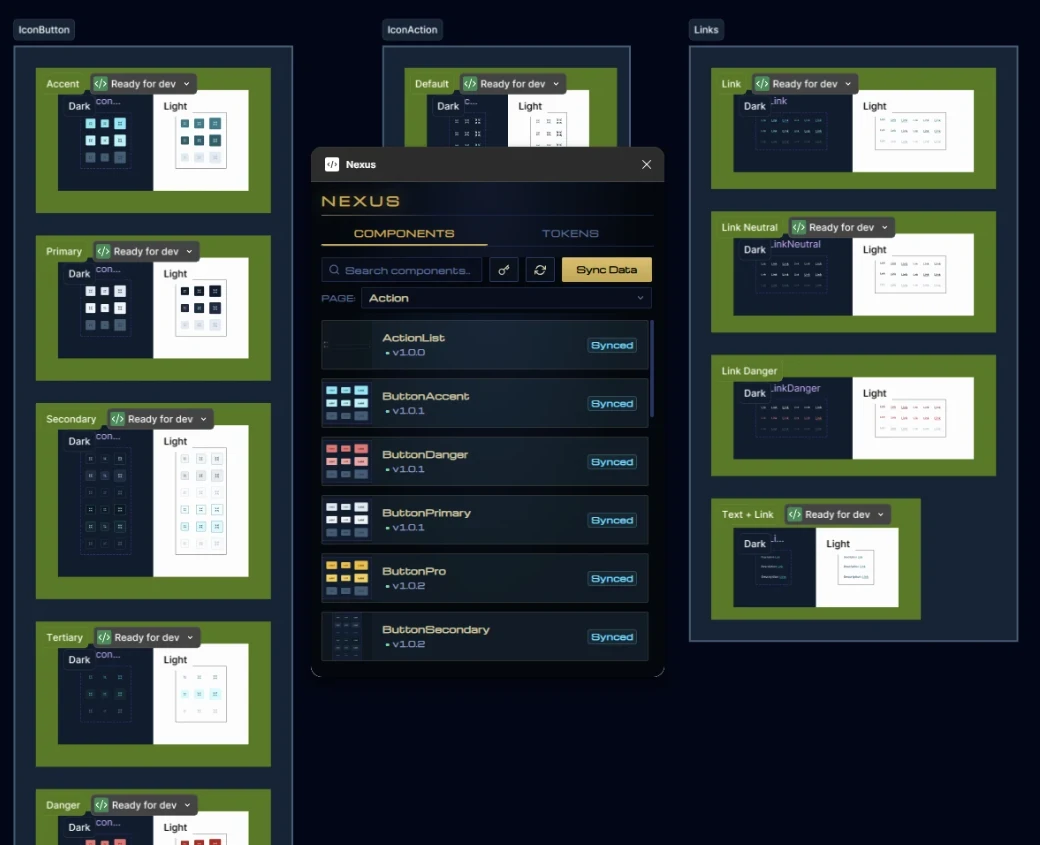
Nexus is a custom Figma plugin. It runs 16 lint rules on every variant: fills, strokes, effects, type, padding, radius, spacing, and a description for each component. While a single issue remains, Publish stays blocked.
When a component passes, Nexus takes a snapshot of every variant, diffs it against the previous version and writes it to the registry with its changelog. Tokens take the same path: Nexus exports the Figma variables to the repo, and a GitHub Action rebuilds the CSS for every theme.
The diff decides the version number.
Every publish creates a new version, and nobody picks the number. Nexus sorts each change in the diff into one of fifteen kinds, and the most severe one wins.
-
Patch
Looks different, works the same.
token_changedstyle_changedlayer_movedprop_default_changed1.4.0 → 1.4.1 -
Minor
Something new, nothing broken.
variant_addedprop_addedprop_option_addedlayer_added1.4.0 → 1.5.0 -
Major
Screens already using it may break.
variant_removedvariant_renamedprop_removedprop_type_changedprop_option_removedlayer_removedname_changed1.4.0 → 2.0.0
The rules live in a single file shared by the plugin and
the MCP server, so both classify the same way. On top of
that, a database trigger rejects any version whose severity
doesn't match its changes. A component's first version is
always v1.0.0.
The Showcase reads this history directly and shows it as each component's changelog.
Any agent, one typed interface.
The MCP server is how agents work with the system: 37 typed tools over Figma, the registry, the tokens and the repo. It isn't tied to one assistant; Claude, Cursor, Codex or Gemini can all connect to it.
Reading is open. Anything that writes to the repo is treated as a deploy and needs an explicit request.
> Which components use the primary hover colour, and what changed in ButtonPrimary lately?ds_get_token_usage { mode: "by_token", token_name: "color/action/primary/bg-hover" } ButtonPrimary, IconButtonPrimaryds_get_versions { name: "ButtonPrimary", limit: 2 } v1.4.1 · patch · token_changed · "Darker hover for AAA contrast" v1.4.0 · minor · prop_option_added · "Add size xs"< Two components use it. ButtonPrimary's last change was a patch: only the hover token moved, so nothing that uses it needs updating.One registry, many readers.
The registry is the product. Everything else is generated from it, and generated again when something changes, for three kinds of reader:
-
People
- ShowcaseLive docs, analytics and changelog.
- NotebookLMAsk the system in plain language.
-
AI agents
- AI-ready pack
llms.txt, per-component specs, rules and gaps. - DESIGN.mdOne-file spec for v0, Stitch, Lovable or Figma Make.
- AI-ready pack
-
Code
- Nuxt labNuxt UI theme generated from Figma, compared side by side.
- DS packThe real components, rendered inside the docs.
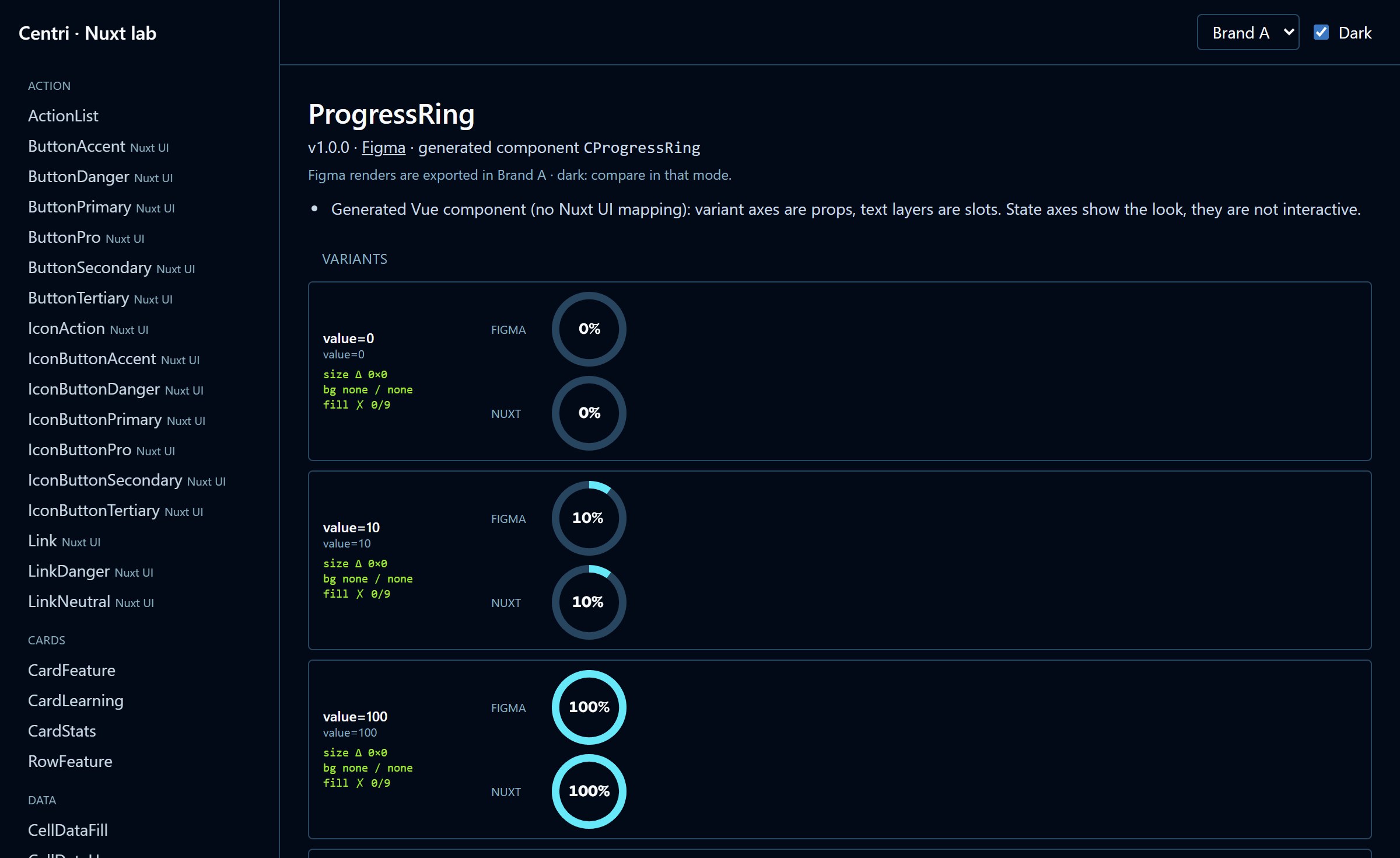
The Nuxt lab is the strictest test. It generates a Nuxt UI theme from the registry and puts every variant next to its Figma render, with an automatic size and colour check. If code drifts from design, it shows.
Agents design with the library, not around it.
The AI-ready pack also works the other way round. With the
figma-prototype skill, an agent takes a brief,
proposes which components to use and, once approved,
builds the screen in Figma using only library components
and variables.
When the brief needs something the library doesn't have,
the agent doesn't draw it. It reports a DS_GAP,
which becomes work for the design team.
From a colour change to the docs.
A designer darkens the hover colour of the primary button. Step by step:
- Tue 09:42 Designer changes ButtonPrimary's hover and hits Publish in Nexus.
- Tue 09:42 Nexus blocks the publish. The new value is hardcoded, not bound to a token.
-
Tue 09:43
Designer binds it to
color/action/primary/bg-hover, writes "Darker hover for AAA contrast" and publishes again. - Tue 09:43 Nexus diffs the snapshot: one token change. Severity patch, v1.4.0 to v1.4.1. Saved to the registry, with a note in Slack.
- Tue 09:44 The Showcase already shows v1.4.1 with its changelog. Nobody had to deploy anything.
- Tue 10:15 The next generator run updates DESIGN.md, the AI-ready pack and the Nuxt theme with the new hover.
One change in Figma. No handoffs.
The system handles the follow-up.
The point is not the speed. It is that no one in the middle has to remember the change, copy the value and reconcile two files.
Today the design, engineering and product teams work from the same registry: designers publish through Nexus, engineers take the generated theme and specs, and agents read the MCP server. Designers spend less time chasing implementations and more time shaping the system itself. Engineers and agents no longer reverse-engineer design decisions from screenshots.
The team's role shifts: less translation, more architecture.